MapleDeploy vs DigitalOcean
Managed Coolify on Canadian infrastructure. Git push deploys without the DevOps.
DigitalOcean offers two paths: raw Droplets (VPS) and App Platform (managed PaaS). Droplets give you full control but require DevOps expertise. App Platform handles deployments but bills per resource, with each container and database as a separate line item. As a Canadian DigitalOcean alternative, MapleDeploy sits in between: a managed PaaS with dedicated resources that runs Coolify, supporting any Docker container or buildpack on Canadian infrastructure.
Side by side
Jurisdiction and ownership
- DigitalOcean
- US company, CLOUD Act applies regardless of server location
- MapleDeploy
- Canadian-owned and operated (SLA, compliance docs)
Databases
- DigitalOcean
- Self-managed on Droplets; managed add-on ($15+ USD/mo)
- MapleDeploy
- One-click, included
Deploys
- DigitalOcean
- Manual for Droplets; git deploys on App Platform
- MapleDeploy
- Git push deploys
DevOps required
- DigitalOcean
- Yes for Droplets; no for App Platform
- MapleDeploy
- No
SSL
- DigitalOcean
- Manual for Droplets; automatic on App Platform
- MapleDeploy
- Automatic
Backups
- DigitalOcean
- Optional Droplet backups (20-30% of Droplet cost/mo, or usage-based from $0.01/GiB/mo); App Platform: deploy rollback, plus backups only on a paid managed database
- MapleDeploy
- Weekly full-server snapshots included, 30-day retention after cancellation
Starting price
- DigitalOcean
- Droplets: from $4 USD/mo (512 MB, unmanaged, no deploys/SSL/databases); App Platform: from $5 USD/mo per container
- MapleDeploy
- From $45 CAD/mo (4 GB RAM dedicated VM, managed, git deploys + SSL + databases included)
Type
- DigitalOcean
- Raw VPS or App Platform (limited PaaS)
- MapleDeploy
- Managed PaaS (we manage the server)
Which DigitalOcean path fits you
If you want to learn Linux administration and have time for server management, a Droplet is cheaper and teaches you more. If you don't need Canadian jurisdiction and per-container billing suits you, App Platform is simpler. MapleDeploy fills the gap: managed deployment on dedicated Canadian infrastructure, with no framework restrictions and no per-resource billing.
The hidden cost of a $4 Droplet
A basic Droplet starts at $4 USD/mo for 512 MB of RAM. That price buys you a blank Linux server. Before you deploy anything, you need to configure a firewall, set up SSH keys, install a reverse proxy, provision SSL certificates with Let's Encrypt, write deployment scripts, and set up log rotation. That is a weekend of work if you've done it before. Longer if you haven't.
Then there is ongoing maintenance. Security patches, unattended upgrades, certificate renewals, monitoring for downtime, and debugging when deploys fail at 2 AM. None of this is included in the $4/mo price. It is included in your time.
Backups are extra too. Droplet backups cost 20-30% of your Droplet price per month, or a usage-based rate from $0.01 per GiB per month, and only capture the full disk image. App Platform itself has no backups: code lives in git and deploys can roll back, and only paid managed databases include backups. The $7/mo development database does not. MapleDeploy includes weekly full-server snapshots on every plan with 30-day retention after cancellation.
A more realistic comparison: a 4 GB Droplet costs $24 USD/mo. Add managed PostgreSQL at $15.15 USD/mo. Add Droplet backups at roughly $5 USD/mo. That is $44 USD/mo before you have written a single deploy script or configured SSL. MapleDeploy's Starter plan at $45 CAD/mo (~$33 USD) includes all of that, managed.
Managed deploys, no scripts required
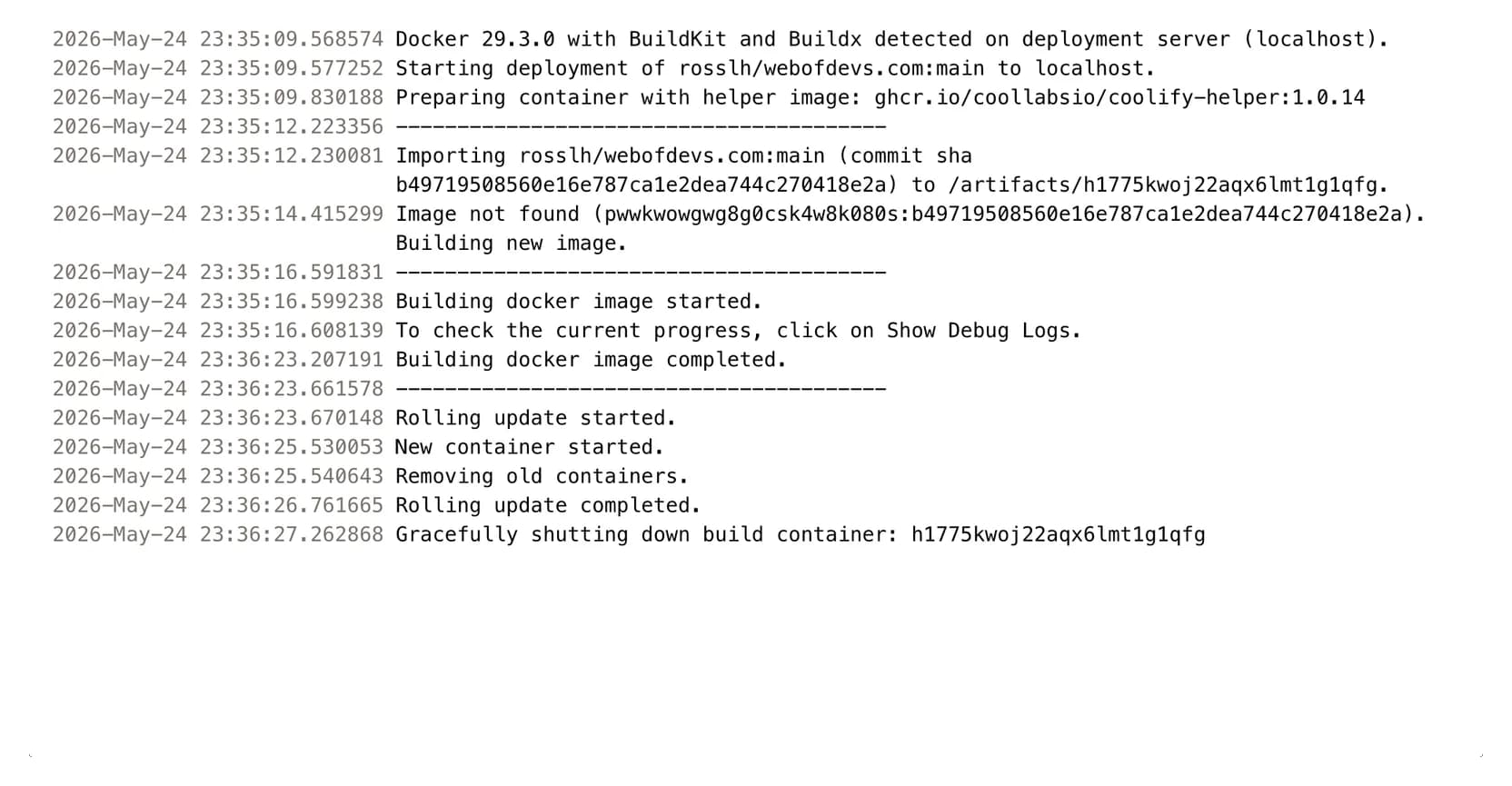
Push your code and watch it deploy. Timestamped build logs, Docker image construction, and container rollouts happen automatically. No deploy scripts, no SSH sessions.
App Platform limitations
App Platform is DigitalOcean's managed PaaS. It handles deploys and SSL, similar to MapleDeploy. The tradeoff is flexibility and cost structure.
App Platform charges per container. A basic 512 MB container costs $5 USD/mo. A 2 GB container costs $25 USD/mo. Each database is a separate line item at $7 USD/mo for a development instance or $15.15 USD/mo for managed PostgreSQL. Run a web app, a worker process, and a database, and you are looking at $17-65 USD/mo depending on container size and database type.
Control is another constraint. App Platform builds from buildpacks or a Dockerfile, including multi-stage builds. What it does not give you is a server you control: no arbitrary background services, no databases you install yourself, and a fixed build environment. MapleDeploy runs Coolify, which supports any Docker container, any Nixpacks-compatible project, and one-click deployments for dozens of services.
The pricing model is the bigger issue. On App Platform, scaling means adding more containers at additional cost. On MapleDeploy, you have a dedicated VM with fixed resources. Deploy as many apps, workers, and databases as your VM can handle. One price, no surprises.
Skip the server setup
Git push and you're live. Managed databases, automatic SSL, Canadian infrastructure.